You can make a case of zero trust for just about every security product out there, so it becomes very hard to understand what zero trust is, and even worse, to overlook important elements. Brett Littrell, CISSP, CCSP shares his journey with zero trust, layer 2: how he came to understand it and why there is no perfect or comprehensive zero trust solution out there.
 Disclaimer: The views and opinions expressed in this article belong solely to the author and do not necessarily reflect those of ISC2.
My zero trust (ZT) journey started before it was even a thing. I worked for a school district and I wanted to segment student networks from teacher networks. Back then – late 90s/early 2000s – we air-gapped the two networks and manually entered allowed MAC addresses into the core switches for every teacher device. Effectively we trusted nothing on the teachers network; devices had to authenticate, albeit weakly, by having the right MAC address.
Around 2005, we started implementing 802.1X on all wired ports with VLAN assignment/segmentation. Even Cisco Certified Internetwork Experts (CCIEs) would tell me it did not work – but, through persistence and research, I was able to get 802.1X working. My motivation for pushing the envelope back then was my ignorance of the limits. Always playing catch-up, I wanted to ensure the schools were as well-protected as better-funded private companies. As I transitioned back into the private sector, I finally realized that I really was pushing the envelope: with one exception, every organization I worked for had little to no layer 2 (L2) security. So, I took up the challenge.
Making Plans for 802.1X
At this point, late in 2012, I started at a company that made networking and security products, including network access controllers (NACs), yet they did not use their own products. Taking on the network architect role, I began to formulate plans.
First, we had to get network access under control. This involved clearly defining a standard and scalable network and creating/breaking networks into segments based on job function and security risk, such as:
- Marketing – Security Risk, Medium: Some travel, setup, and connections to public networks at public events, hotels, etc.
- Sales – Security Risk, High: Lots of travel, constant access to public and foreign networks, bad judgment with software installs, high level of influence to push bad decisions.
- Exec – Security Risk, Medium: Moderate to high level of ignorance regarding cybersecurity, ability to influence bad practice for ease of use.
- Engineering – Security Risk, High: Tendency to use bad security practices for authentication, software installs and have access to source code.
- IT – Security Risk, High: They have the keys to the kingdom.
This can go very deep. But the idea is to know the people I work with, evaluate the risk and decide on which segmented network to place them. The table stakes are to segment based on role and the roles should be based on risk level. One mistake I see repeatedly is to impose heavy restrictions like micro-segmentation right from the start. I find it works better to ease into the more restrictive areas, avoiding backlash and increased efforts to bypass the security.
As I plan L2 security, I also think of higher layers. For instance, traffic stats indicate that around 88% of the web is TLS-encrypted, but firewalls have no way of knowing what is happening unless they decrypt the traffic. It is something that requires additional architectural considerations. One option is to place mobile devices on an isolated network of their own to avoid decryption issues. To do this, I profile devices to identify and place them on an isolated network which I then define on the firewall as something to not decrypt.
There are other areas of contention on networks, outside of IT’s control. One example is building management systems, where I do not get to choose how it connects or what I can load on it to protect it.
Peeling Back the Layers
In modern L2 segmentation environments, I have found it necessary to consider many layers, applications and risk levels, to reduce as many issues as possible. Here are some examples:
- VLAN 100 – Sales: Restrict access to Engineering, or other high security networks; SSL/TLS Decryption enabled; Posture: EDR enabled.
- VLAN 101 – Sales Mobile: Mobile device network, restricted to Internet Access only; SSL/TLS Decryption is disabled.
- VLAN 102 – Staff: Restrict access to some Engineering; SSL/TLS decryption enabled; DLP (if used) enabled; Posture: EPP Enabled, up to date.
- VLAN 103 – Staff Mobile: Unless internal access is specifically needed, treat the same as Sales.
I define other VLANs based on risk levels as well as risk between each other. For instance, I may have one VLAN for very old building management systems and one for more modern ones, the difference being that the more modern ones may require Internet access. Printers are another big risk that I consider for isolation.
In addition to access-based networks I’ve also implemented specialty networks, especially helpful in engineering environments:
- VLAN 200-299: “Engineering Test Systems, Outbound access to the Internet”; Only allows outbound and return traffic; restricts access to internal networks; only allows Engineering client-initiated traffic with certain secure protocols to connect, like SSH.
- VLAN 300-399: “Engineering inbound Internet Access”; Allows in- and outbound traffic to/from the Internet; restricts all access-initiated connections to the internal networks; only allows secure protocols initiated internally from engineering network to the devices; may consider NAT and/or proxy to mask internal networks; may consider deeper-level packet inspection; separate systems from the internal network with a firewall or air gap, to avoid potential VLAN hopping and/or CAM table flooding.
The intent here is that, when designing my L2 security plan, I take into consideration a lot of aspects that will help with adoption, as well as help with other higher-layer security initiatives.
With this general idea in mind, I then figure out how to implement it. IEEE 802.1X has been around long enough to have unparalleled compatibility and has maintained its viability by morphing and extending in a very standards-based and methodical manner. With 802.1X and NACs, my ability to profile and restrict access based on type has increased security while making life easier. I no longer need to care what port something is plugged into: the NAC figures out what it is, while defined rules determine what to do with it; then, through RADIUS communication with the switches, they will be placed on the correct L2 network.
Exceptions to the Rule
There are caveats to overcome, such as “How do I update a system when no-one is logged in?”, or “How do I remediate an issue preventing a device from connecting?”. Many OSs allow for this by registering computer accounts and allowing them to login with 802.1X; in turn, these can be placed on restricted networks that only allow for updating or remediation.
This all gives me a network that prevents a device from getting an IP address or even register in the switch MAC address table, unless there is some type of prior authentication. Authorization to perform an action is predicated on whatever authentication means 802.1X has allowed, be it user/computer account or MAC address, based on profiling and/or posture assessments and the associated rules.
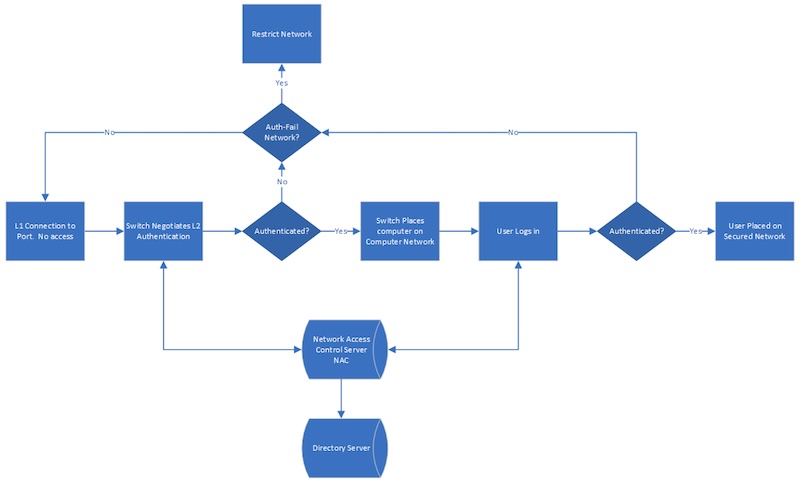
Fig.1. A basic authentication process.
Applying the basic authentication process in Fig.1, no computer is placed on a L2 network before it authenticates, unless there is an auth-fail network defined on the switch. But Fig.2, below, is closer to what I currently have implemented in a school district. It considers user roles and the devices from which they log in, as well as IoT devices - things that do not have actual 802.1X supplicants.
However, this is still only a “medium” complexity authentication process. Once a choice is made to include posture assessments and a change of authority, it can get very complex; indeed, at one previous employer I went into greater depth with posture assessments and direct integrations with layers 3-7. My point is that, as I have, you can adopt this approach to go as deep as you want/need to.
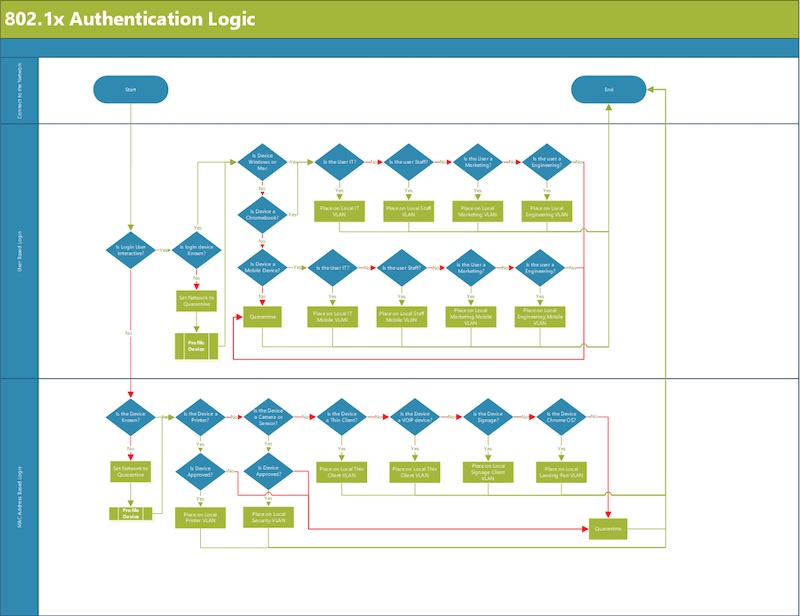
Fig.2. By the use of a change of authority (CoA) packet, a NAC server is able to change its mind on what network a device is supposed to be on. For instance, I configured our NAC to place a machine in the quarantine network if it does not know what it is. From here, it is able to get a DHCP IP address, and the NAC can scan it. If the NAC discovers what it is from this information, it can send a CoA packet to the switch and move the machine to the correct network.
Conclusion
Zero trust, to me, is working through every layer and giving only enough access for things to work, with that access requiring validation by some sort of authentication.
And my view, as I’ve described above, is that 802.1X – although old by technology standards – still offers a very elegant and flexible way to do this at L2. Better yet, it’s a staple feature in any enterprise-grade switch and comes standard on just about every modern OS. As I hope I’ve illustrated with the story of my journey: in Zero Trust terms, you can get as much or as little from 802.1X as you want – limited only by your imagination.
Brett Littrell, CISSP, CCSP, has over 30 years of experience in IT and cybersecurity. He has held engineer, architect, manager and chief roles in educational, healthcare, networking and cybersecurity organizations. His cybersecurity work spans layers 1-7, from the desk to the cloud.